Claude Agent SDK Part 7: Creating Custom MCP Tools
Exposing Python functions as tools Claude can call directly

- David Gérouville-Farrell
- 7 min read
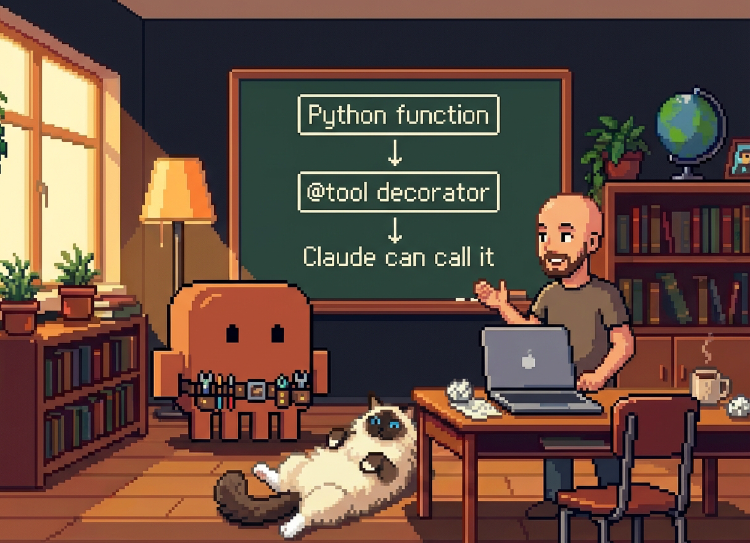
In Part 5, I added file checkpointing with a /rewind command. But /rewind isn’t a real slash command - it’s just my Python code pattern-matching on the input string. Claude has no idea the capability exists.
Although I’m happy to use /rewind myself, I also like the idea of being able to say “hey Claude, could you rewind back to this version?” or “would you mind undoing that thing you just did?” I want Claude to be able to access the rewind and checkpointing features itself. To do that, I need to expose the function as a tool that Claude can call directly - and that means implementing a basic MCP server.
What MCP Tools Are (And Aren’t)
MCP stands for Model Context Protocol. MCP servers aren’t always separate processes or microservices listening on ports - though they can be. They can also be code on your local machine that gets invoked and writes to stdout. Or, if you’re using the Claude Agent SDK, they can be in-process collections of tool definitions that get registered with Claude.
The pattern:
- Define functions with the
@tooldecorator - Bundle them into a “server” with
create_sdk_mcp_server() - Pass the server to
ClaudeAgentOptions - Claude can now call your functions like any other tool
The Rewind Tool
Quick reminder of how rewind works from Part 5: the agent tracks checkpoints as it goes. Each checkpoint has a UUID (from the SDK), a turn number, a timestamp, and a Haiku-generated summary of what happened. The /rewind command lets users pick a checkpoint by index, looks up the UUID, and calls the SDK’s client.rewind_files(uuid) method to restore the files. Our MCP tool will wrap this same logic and expose it to Claude.
Tools are defined using the @tool decorator, which takes three arguments:
- Name: How Claude refers to the tool (
"rewind_files") - Description: Helps Claude understand when to use it. Make this detailed enough that Claude knows what phrases and situations should trigger the tool - don’t be stingy with the description.
- Schema: The expected arguments - here just
{"checkpoint_index": int}
The return format is specific to MCP - a dict with a content array containing text blocks. This is how tool results get passed back to Claude.
Here’s the tool definition:
from claude_agent_sdk import tool, create_sdk_mcp_server
from typing import Any

@tool(
    "rewind_files",
    "Rewind edited files to a previous checkpoint. Use when the user asks to undo, revert, or roll back file changes. Takes a checkpoint_index (0 = oldest). Call this tool when user says things like 'undo that', 'rewind', 'go back to the previous version', or 'revert the changes'.",
    {"checkpoint_index": int}
)
async def rewind_files_tool(args: dict[str, Any]) -> dict[str, Any]:
    """Rewind to a specific checkpoint."""
    index = args["checkpoint_index"]

    if index < 0 or index >= len(state.checkpoints):
        return {
            "content": [{
                "type": "text",
                "text": f"Invalid checkpoint index. Available: 0-{len(state.checkpoints)-1}"
            }]
        }

    target = state.checkpoints[index]

    try:
        await state.client.rewind_files(target.uuid)
        return {
            "content": [{
                "type": "text",
                "text": f"Rewound to checkpoint {index}: {target.summary}"
            }]
        }
    except Exception as e:
        return {
            "content": [{
                "type": "text",
                "text": f"Rewind failed: {str(e)}"
            }]
        }
A few things to note:
-
Arguments come in a dict: The function receives
args: dict[str, Any]and we extractcheckpoint_indexfrom it. This matches the schema we defined in the decorator. -
Validation first: We check if the index is valid before trying to use it. If Claude passes a bad index, we return an error message rather than crashing.
-
state.checkpointsandstate.client: These reference a module-level state object. I’ll explain why this is necessary in the “Scope Problem” section below. -
The return format: I mentioned already that MCP tools must return a dict with a
contentarray. Every return path follows this pattern - success, validation error, and exception all return{"content": [{"type": "text", "text": "..."}]}. This is how the tool’s response gets passed back to Claude. In this case, we return a message confirming which checkpoint we rewound to (including the summary), or an error explaining what went wrong.
Creating the Server
This is the simplest server you can create:
writing_agent_server = create_sdk_mcp_server(
    name="writing-agent-tools",
    version="1.0.0",
    tools=[rewind_files_tool]
)
I give it a name, a version number, and add in the tool we just wrote. The name writing-agent-tools is how Claude addresses this server - it’s a namespace unique to your server, and all your tools are available underneath it. Claude will see our tool as mcp__writing-agent-tools__rewind_files.
Wiring It Up
Add the server to your agent options:
options = ClaudeAgentOptions(
    system_prompt=system_prompt,
    mcp_servers={"writing-agent-tools": writing_agent_server},
    allowed_tools=[
        "Read", "Write", "Edit", "Glob", "Grep",
        "mcp__writing-agent-tools__rewind_files"
    ],
    # ... other options
)
The mcp_servers parameter is a dictionary mapping server names to server objects. The allowed_tools list now includes our custom tool using the mcp__server-name__tool-name format.
With this in place, I can ask Claude to rewind and it uses the tool:
 The tool works! But notice it rewound to checkpoint 0 without asking first.
It works - but there’s a problem. Claude rewound to checkpoint 0 (the very first checkpoint) when I only wanted to go back one step. And it didn’t ask for confirmation before making a destructive change.
Adding Permission Control
Rewind is destructive - it overwrites files. I don’t want Claude auto-rewinding without asking. Using the same hook pattern from Part 6:
async def rewind_permission_hook(
    input_data: HookInput,
    tool_use_id: str | None,
    context: HookContext
) -> HookJSONOutput:
    """Prompt user before rewinding."""
    if input_data.get("hook_event_name") != "PreToolUse":
        return {}
    if input_data.get("tool_name") != "mcp__writing-agent-tools__rewind_files":
        return {}

    tool_input = input_data.get("tool_input", {})
    index = tool_input.get("checkpoint_index", 0)

    if index < 0 or index >= len(state.checkpoints):
        print(f"\n{ERROR}Invalid checkpoint index: {index}{RESET}")
        return {
            "continue_": False,
            "stopReason": "Invalid checkpoint"
        }

    target = state.checkpoints[index]

    print(f"\n{META}Rewind requested:{RESET}")
    print(f"{CODE}  Checkpoint {index}: Turn {target.turn} @ {target.timestamp.strftime('%H:%M:%S')}{RESET}")
    print(f"{CODE}  Summary: {target.summary}{RESET}")
    response = input(f"{USER}Allow rewind? [y/n]: {RESET}")

    if response.lower() == 'y':
        return {
            "hookSpecificOutput": {
                "hookEventName": "PreToolUse",
                "permissionDecision": "allow",
            }
        }
    print(f"{META}(Rewind denied - returning to prompt){RESET}")
    return {
        "continue_": False,
        "stopReason": "User denied rewind"
    }
And add it to the hooks configuration:
hooks={
    "PreToolUse": [
        HookMatcher(
            matcher="Bash",
            hooks=[bash_permission_hook],
            timeout=120
        ),
        HookMatcher(
            matcher="mcp__writing-agent-tools__rewind_files",
            hooks=[rewind_permission_hook],
            timeout=120
        )
    ]
}
Now when Claude decides to rewind, the user sees exactly which checkpoint it’s targeting - including the Haiku-generated summary - and can approve or deny.
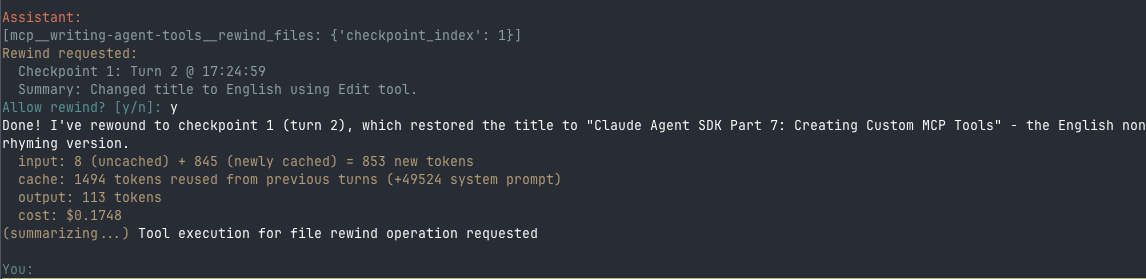 The permission hook shows the checkpoint details. After approval, the rewind completes.
The Scope Problem
There’s an issue with my implementation above. The rewind_files_tool function references checkpoints and client - but those are defined inside run_agent(), not at module scope where the tool is decorated.
The @tool decorator runs at module load time. The function body runs later when Claude calls the tool. At that point, it can only see module-level names - not local variables inside run_agent().
The fix is a state object that lives at module level but gets populated at runtime:
from dataclasses import dataclass, field

@dataclass
class AgentState:
    """Runtime state accessible to MCP tools."""
    checkpoints: list[Checkpoint] = field(default_factory=list)
    client: ClaudeSDKClient | None = None
    session_id: str | None = None

state = AgentState()
Now the tool function references state.checkpoints and state.client. Inside run_agent(), we populate the state:
async def run_agent():
    state.checkpoints = []
    state.session_id = None

    async with ClaudeSDKClient(options=options) as client:
        state.client = client
        # ... rest of the code uses state.checkpoints instead of checkpoints
This avoids raw globals (no global keyword needed) and makes it clear what’s runtime state versus constants.
What’s Next
This is coming together and is almost ready to use. The same pattern works for any Python function I want to expose to Claude. Still to do:
- Starting/stopping the Hugo dev server
- Running the build script to deploy
- A tool to generate images for blog posts
- Working on the system prompt to help Claude understand how I write, how to edit my posts, and what “good” looks like for my blog
The first two are straightforward - same MCP tool pattern. The prompt work is where the real value will come from. Once that’s dialled in, I’ll have a writing agent that actually understands my style and can help improve my posts. Nearly there.
This is Part 7 of my series on learning the Claude Agent SDK. Part 1 covers initial exploration, Part 2 builds the first working agent, Part 3 tackles context control, Part 4 adds usage tracking, Part 5 introduces checkpointing, and Part 6 fixes the Bash bypass problem.