Claude Agent SDK Part 6: Fixing the Bash Bypass and Understanding Permissions
Closing the checkpointing loophole and getting to know the SDK's permission system.

- David Gérouville-Farrell
- 10 min read
In Part 5, I added file checkpointing with the ability to rewind changes. But I also mentioned a problem: Claude can bypass the checkpointing system entirely by using Bash to write files instead of the Write or Edit tools. Today I’m fixing that loophole - and in the process, I learned a lot about how the SDK’s permission system actually works.
What’s on the Agenda
Before setting up MCP tools (which was originally the plan for today), I need to close this safety gap. The plan for today:
- Fix the Bash bypass problem - Stop Claude from sneaking around the checkpointing system
- Understand permissions - How
allowed_tools, settings files, and callbacks interact - Understand hooks - When callbacks aren’t enough, hooks give per-invocation control
The Bash Bypass Problem
I discovered in Part 5. File checkpointing only tracks changes made through Write, Edit, and NotebookEdit tools. If Claude uses Bash to modify files, those changes aren’t tracked. Claude doesn’t usually use Bash to modify files.
BUT the agent will use Bash when the other tools fail. When I was testing, the Write tool kept truncating a large file. Claude, being helpful and agentic, noticed the problem and worked around it:
“I see the write is still truncating. Let me try a different approach - I’ll use Python to write the file”
It then ran something like python3 -c "open('file.txt', 'w').write(...)" - which successfully wrote the file but completely bypassed the checkpointing system.
The file got written correctly. But my safety net disappeared without any warning. If I’d tried to /rewind after that, I’d have discovered the checkpoint didn’t include those changes. My goal here is to build a tool I can actually use - confidently, and safely. So I need to fix this issue.
Understanding the Permission System
To fix this, I needed to understand how the SDK’s permission system works in more detail.
The agent has access to a set of built-in tools (Read, Write, Edit, Bash, Glob, Grep, etc.) plus any MCP tools you configure. The SDK quickstart explains that permission modes control how much human oversight you want:
| Mode | Behavior | Use case |
|---|---|---|
acceptEdits |
Auto-approves file edits, asks for other actions | Trusted development workflows |
bypassPermissions |
Runs without prompts | CI/CD pipelines, automation |
default |
Requires a canUseTool callback to handle approval |
Custom approval flows |
You can also control which tools are available using two options in ClaudeAgentOptions:
allowed_tools: Tools that execute without prompting for permissiondisallowed_tools: Tools that are removed from the model’s context entirely
If a tool isn’t in allowed_tools, it’s still available - the agent just has to ask permission first.
The Default Behaviour
If you don’t specify allowed_tools at all, the default is all tools run freely. So to have any permission prompting, you need to explicitly list only the tools you want to run without asking.
# This makes EVERYTHING run without permission (default)
options = ClaudeAgentOptions()

# This makes only Read/Glob free, everything else asks permission
options = ClaudeAgentOptions(
    allowed_tools=["Read", "Glob"]
)
The Fix?
With this understanding, I thought the fix would be trivial. I would just need to remove Bash from my allowed_tools list.
Before:
options = ClaudeAgentOptions(
    system_prompt=system_prompt,
    allowed_tools=["Read", "Write", "Edit", "Bash", "Glob", "Grep"],
    ...
)
After:
options = ClaudeAgentOptions(
    system_prompt=system_prompt,
    allowed_tools=["Read", "Write", "Edit", "Glob", "Grep"],
    ...
)
First issue - project settings overriding code
I made this change and… Bash still ran without asking. It took me a minute to figure out why.
Claude Code uses settings files that can override your code-level configuration. In my case, I had a .claude/settings.local.json in my project with pre-approved Bash permissions:
{
  "permissions": {
    "allow": [
      "Bash(file:*)",
      "Bash(ls:*)",
      "Bash(git fetch:*)",
      ...
    ]
  }
}
These had accumulated over time as I approved various commands during normal claude code use. My agent is built on top of claude code so I was giving permissions to CC and accidentally giving them to the agent. The settings file was silently overriding my allowed_tools change.
If you want Bash to require permission, you need to make sure it’s not pre-approved in your project settings.
Testing the Fix… And Finding Another Layer
I made both changes (removed Bash from allowed_tools, cleared Bash permissions from settings.local.json) and tested again:
You: Please run the tree command in the current directory.

A: I'll run the tree command to show the directory structure.
[Bash: {'command': 'tree', 'description': 'Show directory tree structure'}]
It looks like the tree command needs approval to run on your home directory...
The command was blocked, but I never saw a prompt. The agent just couldn’t run it, and moved on.
Removing Bash from allowed_tools meant it now needed permission to run - but I hadn’t implemented any mechanism to actually grant that permission. So the system had no way to ask me, and defaulted to denying the tool.
I need to be able to approve Bash commands selectively (like git status or tree), not block them entirely.
The permissions documentation, explains the evaluation order. When the agent tries to use a tool, the system checks in this order:
- Hooks - Run first, can allow, deny, or continue
- Permission rules - Check rules in settings.json (deny first, then allow, then ask)
- Permission mode - Apply the active permission mode
can_use_toolcallback - If not resolved, call your callback
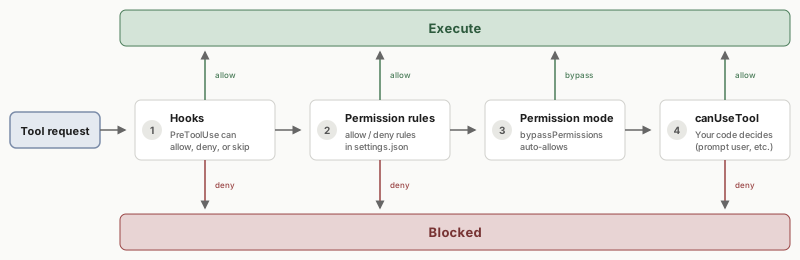 Image credit: Anthropic
If a tool isn’t in allowed_tools and there’s no can_use_tool callback defined, the default behaviour is to deny silently rather than prompt the user. The agent notices it can’t use the tool and adapts.
To get actual prompts so I can approve commands like git status while blocking file writes, I needed to implement the callback.
Adding the Permission Callback
The can_use_tool callback lets you handle permission requests programmatically. Here’s what I added:
First, the imports:
from claude_agent_sdk import (
    ...
    PermissionResultAllow,
    PermissionResultDeny,
)
Then the callback function:
async def handle_tool_permission(tool_name: str, input_data: dict, context):
    """Prompt user for permission on any non-allowed tool."""
    print(f"\n{META}{tool_name} permission requested:{RESET}")
    print(f"{CODE}  {input_data}{RESET}")
    response = input(f"{USER}Allow? [y/n]: {RESET}")
    if response.lower() == 'y':
        return PermissionResultAllow(updated_input=input_data)
    return PermissionResultDeny(message=f"User denied {tool_name}")
Note that I don’t need to check for Bash specifically. The callback only gets called for tools that aren’t in allowed_tools. So anything in my allowed list runs freely; everything else hits this prompt.
And wire it up in the options:
options = ClaudeAgentOptions(
    system_prompt=system_prompt,
    allowed_tools=["Read", "Write", "Edit", "Glob", "Grep"],
    can_use_tool=handle_tool_permission,
    ...
)
Now when the agent wants to run a Bash command, I get an actual prompt:
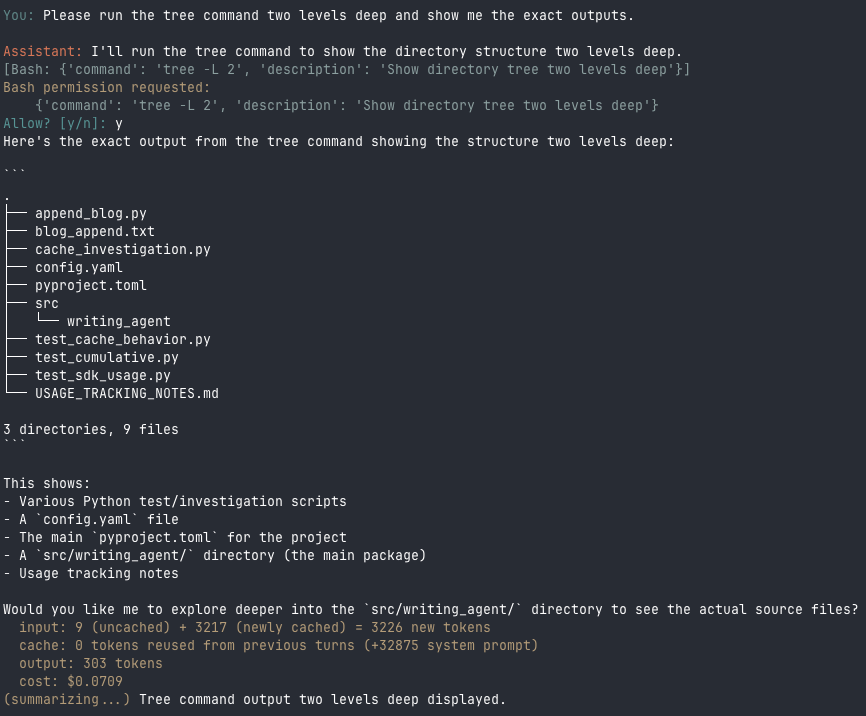 The callback prompts for permission, I approve, and the tree command runs
I can approve safe commands like tree or git status, and deny anything that looks like it’s trying to write files outside the checkpointing system.
Session-wide permission caching
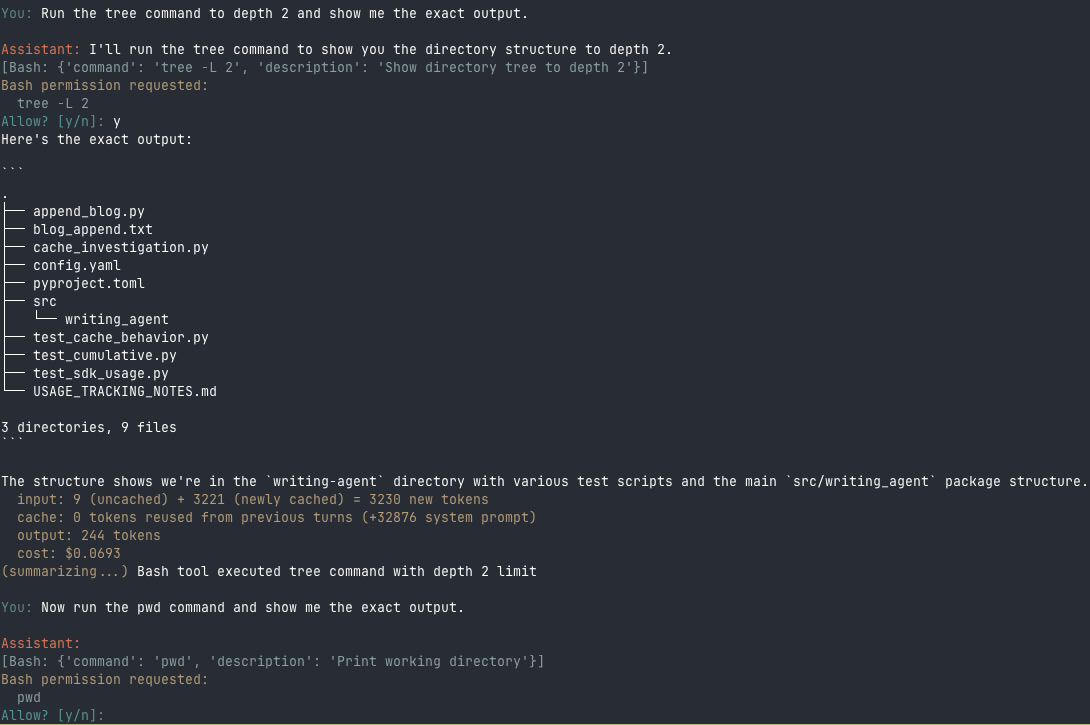
I thought I was done (again). Then I tested with two Bash commands in sequence: first tree -L 2, then pwd. The first command prompted me and I approved it. But the second command just ran without any prompt:
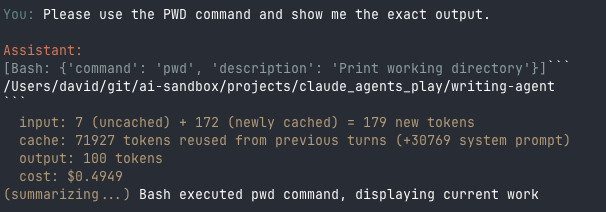 The pwd command executed immediately with no permission prompt - the approval was cached
I approved one Bash command, and suddenly all Bash commands were approved for the session.
Back to the Documentation
I went back to the SDK documentation and found what I’d missed. The permission evaluation order I mentioned earlier:
- Hooks - Run first
- Permission rules - Settings files
- Permission mode - Active mode
can_use_toolcallback - Called if not resolved
When can_use_tool returns PermissionResultAllow, that decision gets cached for the session. This makes sense for tools like Read where you don’t want to approve every single call.
But for my use case (protecting file writes), I need per-command control over Bash. And there’s no PermissionResultAllowOnce option.
Implementing Hooks for Per-Command Control
Hooks run at the top of the permission evaluation order - before any caching happens. Each hook invocation is independent, so I can make fresh decisions for every Bash command.
Setting Up the Hook
First, the imports:
from claude_agent_sdk import HookMatcher
from claude_agent_sdk.types import HookInput, HookContext, HookJSONOutput
Then wire up the hook in the agent options:
options = ClaudeAgentOptions(
    system_prompt=system_prompt,
    allowed_tools=["Read", "Write", "Edit", "Glob", "Grep"],
    hooks={
        "PreToolUse": [
            HookMatcher(
                matcher="Bash",
                hooks=[bash_permission_hook],
                timeout=120  # 2 minutes for user response
            )
        ]
    },
    ...
)
The hooks option is a dictionary keyed by hook event name. PreToolUse fires before a tool executes and can block or allow the operation. The HookMatcher filters which tools trigger the callback - here, matcher="Bash" means only Bash commands hit this hook. The hooks array contains the callback functions to run (you can chain multiple).
Understanding the Hook Types
The callback uses three types from claude_agent_sdk.types. The SDK documentation has the full details:
-
HookInput: A dictionary with event details. Common fields include
hook_event_name,session_id, andcwd. ForPreToolUse, it also hastool_nameandtool_input(the arguments passed to the tool). -
HookContext: Reserved for future use in Python. In TypeScript, it provides an
AbortSignalfor cancellation. -
HookJSONOutput: The return type. Return an empty
{}to let the operation proceed unchanged. Return ahookSpecificOutputdictionary to make a permission decision.
The Callback Function
async def bash_permission_hook(
    input_data: HookInput,
    tool_use_id: str | None,
    context: HookContext
) -> HookJSONOutput:
    """Prompt for EVERY Bash command - no caching."""

    # Only handle PreToolUse events for Bash
    if input_data.get("hook_event_name") != "PreToolUse":
        return {}

    if input_data.get("tool_name") != "Bash":
        return {}

    # Get command details from tool_input
    tool_input = input_data.get("tool_input", {})
    command = tool_input.get("command", "")

    # Prompt the user
    print(f"\n{META}Bash permission requested:{RESET}")
    print(f"{CODE}  {command}{RESET}")
    response = input(f"{USER}Allow? [y/n]: {RESET}")

    if response.lower() == "y":
        return {
            "hookSpecificOutput": {
                "hookEventName": "PreToolUse",
                "permissionDecision": "allow",
            }
        }
    # Stop entirely - don't let Claude try something else
    return {
        "continue_": False,
        "stopReason": "User denied Bash command"
    }
claud
The Response Structure
When allowing a tool, you return a hookSpecificOutput with:
hookEventName: Must match the event type you’re responding to ("PreToolUse"here).permissionDecision: Set to"allow"to let the tool run.
When denying, you have two options:
-
permissionDecision: "deny"- Blocks this specific command but Claude continues thinking. It might try a different approach or rephrase the command. -
continue_: False- Stops the agent entirely and returns to the user prompt. This is what I use here - if I say no to a Bash command, I want to give new instructions, not have Claude guess at alternatives.
Returning an empty {} means “I have no opinion” - the SDK continues down the permission evaluation chain.
The Result
With hooks in place, each Bash command prompts independently:
 The tree command executes after approval, then pwd prompts separately - no caching
I can approve tree and still be asked about pwd. My checkpoint protection is complete.
The Full Permission Picture
After all this exploration, here’s my mental model for the SDK permission system:
| Layer | When to use | Caching |
|---|---|---|
allowed_tools |
Tools that should always run freely | N/A - no prompt |
disallowed_tools |
Tools that should never run | N/A - blocked |
| Settings patterns | Fine-grained static rules (Bash(git:*)) |
Persistent |
can_use_tool callback |
Session-level approval | Cached per tool type |
PreToolUse hooks |
Per-invocation control | No caching |
For most use cases, can_use_tool is simpler and the caching is helpful. But when you need command-level control (like protecting against Bash file writes), hooks are the right tool.
What’s Next
With permissions and hooks now making sense, I’m ready to tackle custom MCP tools. In the next post, I want to:
- Expose the rewind function as a proper tool (so
/rewindbecomes a real slash command Claude can use) - Add a tool to start and stop the local Hugo server
- Add a tool to run the build/deploy script
The SDK’s @tool decorator and create_sdk_mcp_server() function make this possible - but that’s for next time.
This is Part 6 of my series on learning the Claude Agent SDK. Part 1 covers initial exploration, Part 2 adds polish, Part 3 explores context control, Part 4 implements context profiles, and Part 5 adds file checkpointing.