Claude Agent SDK Part 3: The Context Control Problem
Discovering the trade-offs between agency and control when building on the Claude Agent SDK.

- David Gérouville-Farrell
- 6 min read

Building on Part 1 and Part 2, today I wanted to add context management to the writing agent. What I discovered instead was a slightly annoying fundamental trade-off in the SDK’s design.
Why Context Control Comes First
When I use AI-supported writing, I’m not trying to get it to do most of the writing. I’m trying to get it to help me with cleanup, editing, gap analysis, and checking details. So what I’m really looking for is control over the context so that AI is more like an expert editor / sounding board.
As with all uses of AI agents, context engineering is crucial to controlling the kinds of outputs the AI will give. The first thing I want in a writing agent isn’t style control or anything fancy like that - it’s a lot of context control.
When I use AI Studio from Google, I like how you can see how many tokens each prompt or file adds to the context. And I like that you can delete or edit them. I want to add similar control to our writing agent.
Claude Code already has something like this built in - the /context command shows a breakdown of everything loaded and how many tokens each item uses:
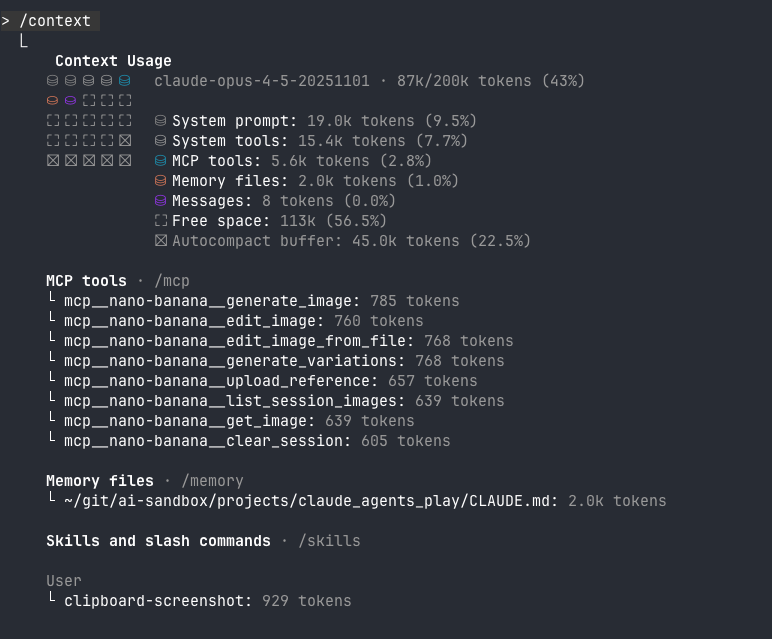 Claude Code’s context view shows token counts per item, organised by category, with an overall usage summary
This is similar what I want to build: visibility into what’s loaded, how much space it takes, and the ability to add or remove items.
The Wishlist
I want to be able to:
- Toggle individual context items on or off
- Manually add files to the context
- Ask the AI to edit items that are in the context
- Add URLs and have the AI grab the content, and shove it in the context
- See token counts for everything
- Control what the AI sees on every turn
I started with basics: point to a text file, tokenise it, and have it in a list of context items that we can toggle on or off.
| Command | Action |
|---|---|
/add-context |
Prompt for path, tokenize, add to store |
/context |
Show all items with token counts |
/remove-context |
Remove an item by number |
/toggle-context |
Toggle an item on/off |
Simple enough, right? That’s that I thought - but it was messy.
The Token Counting Problem
How do I count tokens?
Attempt 1: A tiktoken equivalent
OpenAI publishes tiktoken, a fast local tokenizer. It’s what everyone uses for GPT token counting. But Claude uses a different tokenizer - and Anthropic doesn’t publish theirs. Using tiktoken with cl100k_base gives you estimates, but they would be something 10-15% off (guess - due to tokenizer differences). So this is a dead end for me since I’m trying to manage a context budget.
Attempt 2: Anthropic’s count_tokens API
The Anthropic API has a /v1/messages/count_tokens endpoint that returns exact Claude token counts. Perfect! Except… it requires an ANTHROPIC_API_KEY environment variable because it’s the Anthropic api - not the Agents SDK.
Our writing agent uses the Claude Agent SDK, which I’m authenticating through Claude Code’s existing credentials (stored in ~/.claude/.credentials.json). You can also use an ANTHROPIC_API_KEY if you prefer, but it’s nice that users with a subscription don’t need a separate API key. Adding a requirement for a separate API key just for token counting feels a wee bit wrong.
I searched the SDK for a count_tokens method and came up empty. There’s no way to count tokens before sending content.
ResultMessage.usage: Token Counts After Submission
After each query, the SDK returns a ResultMessage with a usage dict containing detailed token breakdowns:
{
    'input_tokens': 3,
    'output_tokens': 72,
    'cache_creation_input_tokens': 2065,
    'cache_read_input_tokens': 12834,
    'service_tier': 'standard',
    ...
}
This gives you accurate counts after each turn - you just can’t count before sending like the count_tokens API would let you do.
For my use case (knowing roughly how much context I’m using), this is actually fine. I can:
- Track cumulative token usage across a session
- See how much each turn added
- Monitor costs in real-time
And since adding a file to the context profile immediately injects it into the current conversation anyway, I get the exact token count back right away.
However, the bigger issue is context control, not specifically counting the tokens. With the Agent SDK there are some larger trade-offs that affect my original plan.
A Bigger Issue with Context Control
The token counting problem led me to a bigger question: what control do I actually have over the conversation history?
With the standard Anthropic API, you control everything. Every API call, you send the complete messages array:
response = client.messages.create(
    model="claude-sonnet-4-5",
    messages=[
        {"role": "user", "content": "First message"},
        {"role": "assistant", "content": "First response"},
        {"role": "user", "content": "Second message"},
        # You control exactly what's here
    ]
)
This means you can:
- Delete messages (including tool calls that went wrong or that you no longer need)
- Edit previous messages
- Inject context at any point
- Remove context you no longer want
- Have perfect, granular control over what the model sees
With the Claude Agent SDK, you’re deliberately abstracted away from this detail. You send queries, you receive responses. Claude Code manages the conversation history internally. You can:
- Add to the conversation
- Resume a session
- Fork a session
But you cannot:
- Edit the history
- Delete messages
- Remove context once it’s in there
The Trade-off
This is a design choice by Anthropic I belive.
The Agent SDK gives you:
- Tool use handled automatically
- Permission management
- Subprocess isolation
- Claude Code’s authentication
- Claude Code capabilities like careful file editing and compaction etc
In exchange, you give up low-level control over the context window.
It seems I can’t have my cake and eat it. I can’t take advantage of the agency offered by the Claude Agent SDK while also having perfectly granular control over the context history.
The Meta-Context Approach
So I’m changing strategy.
Instead of trying to dynamically control what’s in the conversation (which I can’t do), I’ll maintain a context profile - a curated set of relevant files that lives outside any individual conversation.
┌─────────────────────────────────────────┐
│         META-CONTEXT PROFILE            │
│  (persists across conversations)        │
│                                         │
│  [✓] draft-post.md     (1,234 tokens)   │
│  [✗] old-notes.md      (892 tokens)     │
│  [✓] style-guide.txt   (456 tokens)     │
└─────────────────────────────────────────┘
              │
              │ on /new, /clear, or compact
              ▼
┌─────────────────────────────────────────┐
│         NEW CONVERSATION                │
│  (only enabled items injected)          │
└─────────────────────────────────────────┘
The rules:
/add-contextadds a file to the profile AND sends it to the current conversation/toggle-contextchanges the enabled status in the profile (but doesn’t affect the current conversation)/contextshows the profile with toggle states and token counts/newor/clearstarts fresh, injecting only enabled items
What this means in practice:
- Context builds up naturally as I work
- I can curate what matters (toggling things on and off, depending what I’m wanting the agent to do)
- When I start a new conversation, my curation is respected
- I have perfect control at the beginning of each conversation, even if I can’t edit mid-conversation
It’s not exactly what I originally planned. But it’s a reasonable compromise that works with the SDK’s design rather than fighting against it.
What’s Next
In the next post, I’ll implement this meta-context system:
- The
ContextStoreclass with add, toggle, remove - Usage tracking with exact token counts from the SDK after each turn
- Injecting enabled context on conversation reset
- Maybe persisting the context profile to disk
The individual conversation remains ephemeral. The context profile evolves with my project.
This is Part 3 of my series on building with the Claude Agent SDK. Part 1 covers the basics, Part 2 adds multi-line input and streaming output.